
Lesson 1 of Mastering AI Stacks, a written course in 14 lessons. This first lesson is free to read here — no sign-up. See the full curriculum.
Mastering AI Stacks • Lesson 1
Objective
Define the core elements of the modern artificial intelligence landscape and understand the transition from static software integrations to dynamic, agentic cognitive architectures.
In Brief: What Is an AI Stack?
An AI stack is the set of AI models, tools and connections a business uses together to get work done, arranged so each tool does the job it is best at and passes clean output to the next. The stack has four layers: the infrastructure that runs the models, the foundation models themselves, the orchestration layer that moves work between them, and the applications and agents your team actually touches.
Why This Course Exists
Most businesses meet AI one chat window at a time. Someone on the team signs up for ChatGPT, someone else prefers Claude, a third person discovers that Gemini is already inside the company’s Google Workspace, and within six months the business is paying for four subscriptions that nobody has connected to anything. Each tool is impressive on its own. Together they produce scattered drafts, copy-and-paste fatigue and no measurable change in how much work gets done.
This course takes the opposite approach. Instead of asking “which AI is best?”, it asks “which AI is best at this step, and how does its output get to the next step without a human retyping it?” That question is what turns a pile of subscriptions into a stack. Over fourteen lessons you will learn what each major platform is genuinely good at, how to connect them, how to keep them safe and accurate, and how to reorganise your team’s work around them.
The Vocabulary You Need
AI marketing is full of terms used loosely. You do not need to be an engineer, but you do need to know what these mean, because vendors use them to sell and you will use them to buy.
| Term | What it actually means | Why it matters to you |
|---|---|---|
| Machine Learning (ML) | Software that learns patterns from examples instead of following hand-written rules. | Behind spam filters, ad bidding and product recommendations you already rely on. |
| Natural Language Processing (NLP) | The branch of ML that reads, classifies and produces human language. | Powers sentiment analysis, search intent classification and chat interfaces. |
| Generative AI (GenAI) | Models that create new text, images, audio or video rather than just labelling existing data. | The category behind every content tool in this course. |
| Large Language Model (LLM) | A generative model trained on enormous amounts of text that predicts the most useful next words. | ChatGPT, Claude and Gemini are all LLM products. |
| Context window | How much text the model can consider at once, measured in tokens (roughly three-quarters of a word each). | Decides whether you can hand it a whole contract, a whole website or only a page. |
| Agent | An AI system that can plan steps, use tools and take actions, not just answer. | The shift this course is built around. |
From Deterministic Software to Probabilistic Engines
Traditional business software is deterministic: the same input always produces the same output. A spreadsheet formula never decides to be creative. That predictability is why we trust it with invoices.
LLMs are probabilistic. They produce the most likely good answer, and the same prompt can produce different wording each time. That is a feature when you want ten headline options and a hazard when you want a tax figure. The single most important skill in building an AI stack is knowing which steps can tolerate variation and which cannot, then putting deterministic checks around the steps that cannot.
A practical rule: let AI draft, classify, summarise and suggest; let deterministic systems calculate, store, approve and publish. You will see this rule again in Lessons 12 and 13, where we build validation layers around every point where AI output becomes a business record.
The Four Layers of the Stack
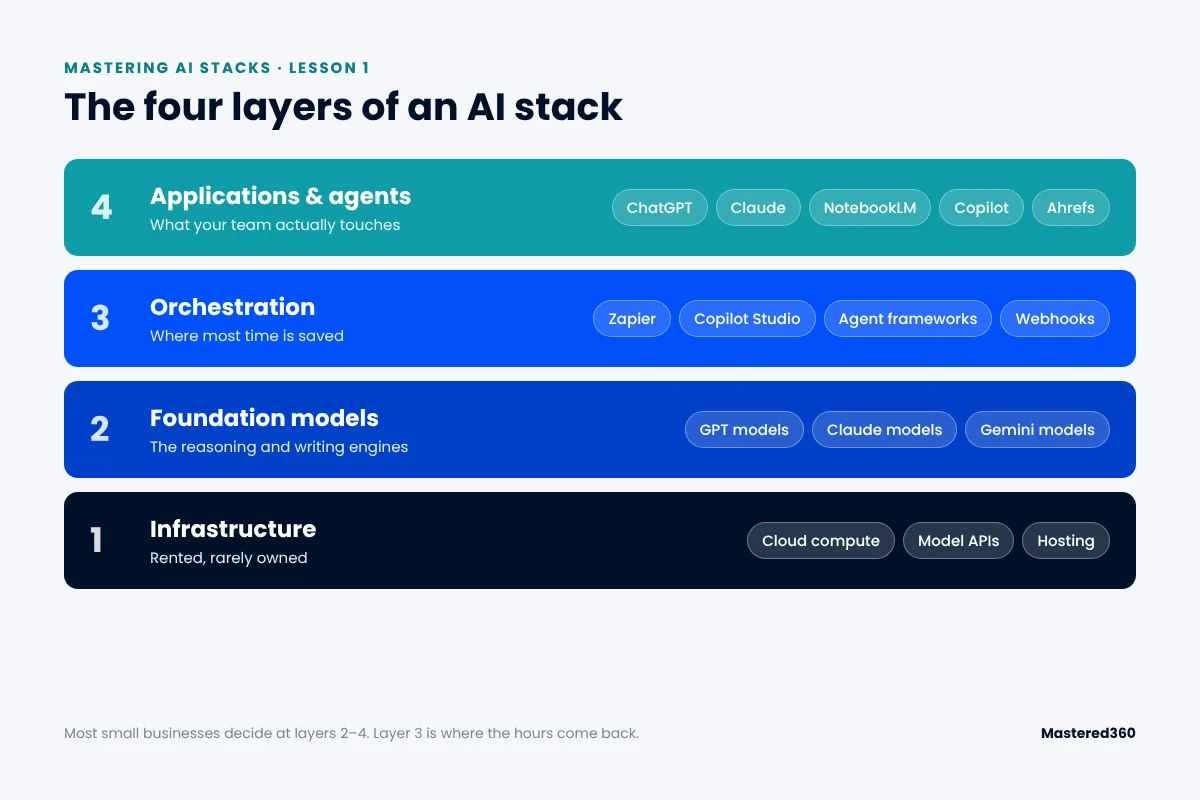
| Layer | What lives here | Examples you will meet in this course |
|---|---|---|
| 1. Infrastructure | The chips, cloud and hosting that run models. Most businesses rent this rather than own it. | Cloud providers behind the APIs you call. |
| 2. Foundation models | The general-purpose models that do the reasoning and writing. | OpenAI’s GPT models, Anthropic’s Claude, Google’s Gemini. |
| 3. Orchestration | Whatever moves work between tools: triggers, routing, memory, approval steps. | Zapier, Copilot Studio, agent frameworks, custom code. |
| 4. Applications & agents | The interfaces your team uses and the agents that act on your behalf. | ChatGPT, Claude, NotebookLM, Copilot in Word and Excel, SEO platforms. |
Most small and mid-sized businesses only need to make decisions about layers 2 to 4. The trap is spending all your attention on layer 2, comparing models, while ignoring layer 3, which is where time is actually saved.
Finding the Work Worth Delegating
Before you buy anything, find out where the hours go. The best candidates for AI delegation are what operations people call swivel-chair processes: tasks where a person reads something in one system and retypes or reformats it into another. They are repetitive, low-judgement, and painful, and they are almost always invisible to management because nobody writes them down.
Typical swivel-chair processes in a marketing or service business:
- Copying enquiry details from a website form into a CRM, then writing a reply.
- Turning meeting notes into a follow-up email and a task list.
- Reformatting a long article into social posts, a newsletter blurb and a video script.
- Pulling the same five numbers from three dashboards into a monthly report.
- Rewriting product or service descriptions for different directories and platforms.
Practical Exercise: Your Baseline Workflow Audit
- Pick one recurring workflow your team runs at least weekly, such as handling new leads or producing the monthly report.
- Write every step on its own line, including the boring ones (“open Gmail”, “copy the phone number”).
- Beside each step, note the time it takes and mark it R (requires judgement), T (transfer or retyping) or C (creating a first draft).
- Total the time spent on T and C steps. Those minutes are your first automation target.
- Keep this audit. You will return to it in Lesson 12 to design your stack around it.
Tool Focus: Your First Workbenches
Every major model provider offers two doors. The consumer app (ChatGPT, Claude, Gemini) is where you think, draft and test ideas. The developer console is where you see exactly what the model receives and returns, change settings like temperature (how adventurous the wording is), and save prompts that other tools can call. In this course you will use the OpenAI developer platform’s playground and the Claude Console alongside the everyday apps. You do not need to write code to use either; you need them because they show you what a prompt really is once it leaves the chat window.
How to Stack It
Choose one conversational assistant as your command centre: the place where you plan, draft briefs and review output from every other tool. It does not matter much which one, as long as the whole team agrees. Every later lesson adds a specialised tool that either feeds the command centre (research, data, SEO metrics) or takes work from it (automation, publishing, video). One centre with clear spokes beats five tools nobody connects.
Key Takeaways
- A stack is defined by how tools connect, not by how many you pay for.
- Use AI where variation is acceptable; wrap deterministic checks around everything that becomes a record.
- Orchestration (layer 3) is where most of the time savings live.
- Start with a workflow audit, not a software purchase.
Rather Have This Done for You?
Setting up and connecting these tools takes real hours. If you would rather have it built around your business, book a free consultation with the Incognito Worldwide team, or explore the tools we recommend at i2 Web Services.
Product names, features and dates in this lesson were checked in November 2026.
Third-party products are named for teaching purposes only. Mastered360 has no affiliation with, and receives no compensation from, the companies named; nothing here is an endorsement. Capabilities and pricing change often — check with the vendor before buying.
Keep going
The next 13 lessons cover SEO and AEO platforms, Zapier automation, AI video, structured outputs, Claude, Gemini, NotebookLM, Microsoft 365 Copilot, multi-agent teams, prompting, API pipelines, data safety and governance — each with a diagram and a short quiz.